
Official plugins
Custom code — add Google Analytics, a Pixel or chat
The official Custom code plugin — insert HTML/JavaScript into the head and before /body of every page, for Google Analytics, Facebook Pixel, Google Search Console or a chat widget
On this page
The Custom code plugin (custom-code) inserts code from outside services into every page, without editing the theme or writing Site Code.
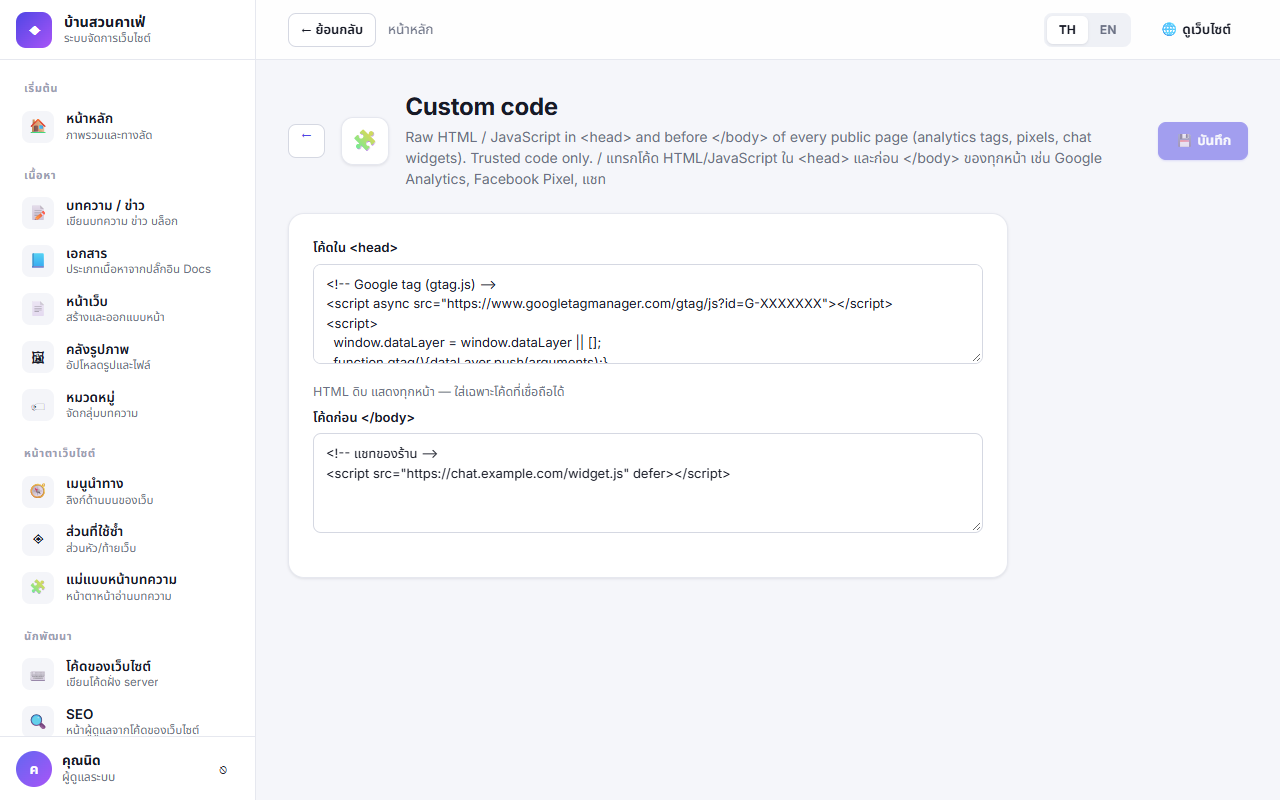
Using it#
- Plugins → Custom code → Settings
- Paste the code into the box the service tells you to:
- Code in
<head>— Google Analytics (gtag), the first part of Google Tag Manager, Search Console's verification meta - Code before
</body>— chat widgets, Facebook Pixel, GTM's noscript part
- Code in
- Save, then open the site — the code is on every designed page and the 404 page
Each box holds up to 100,000 characters.
The code is inserted exactly as written (the head-scripts permission). A script here can do anything to the page — use only code from sources you trust, and let only administrators change the plugin's settings.
Tracking scripts and PDPA#
Scripts with tracking cookies should wait until the visitor accepts. Use them with Cookie consent:
<script>
  function startTracking() { /* gtag or Pixel code here */ }
  if (window.anasakiConsent === 'accepted') startTracking();
  document.addEventListener('anasaki:consent', e => e.detail === 'accepted' && startTracking());
</script>
Put this in the before </body> box so the Cookie consent banner loads first.