
Official plugins
Redirects — keep old links working
The official Redirects plugin — 301/302/307/308 rules from old links to new ones, query forwarding, loop protection and a not-found (404) log you can turn into rules in one click
On this page
The Redirects plugin (redirects) sends people who open an old link to the new page. Use it when you rename a page, move posts or move from an old website, so shared links and your Google ranking survive.
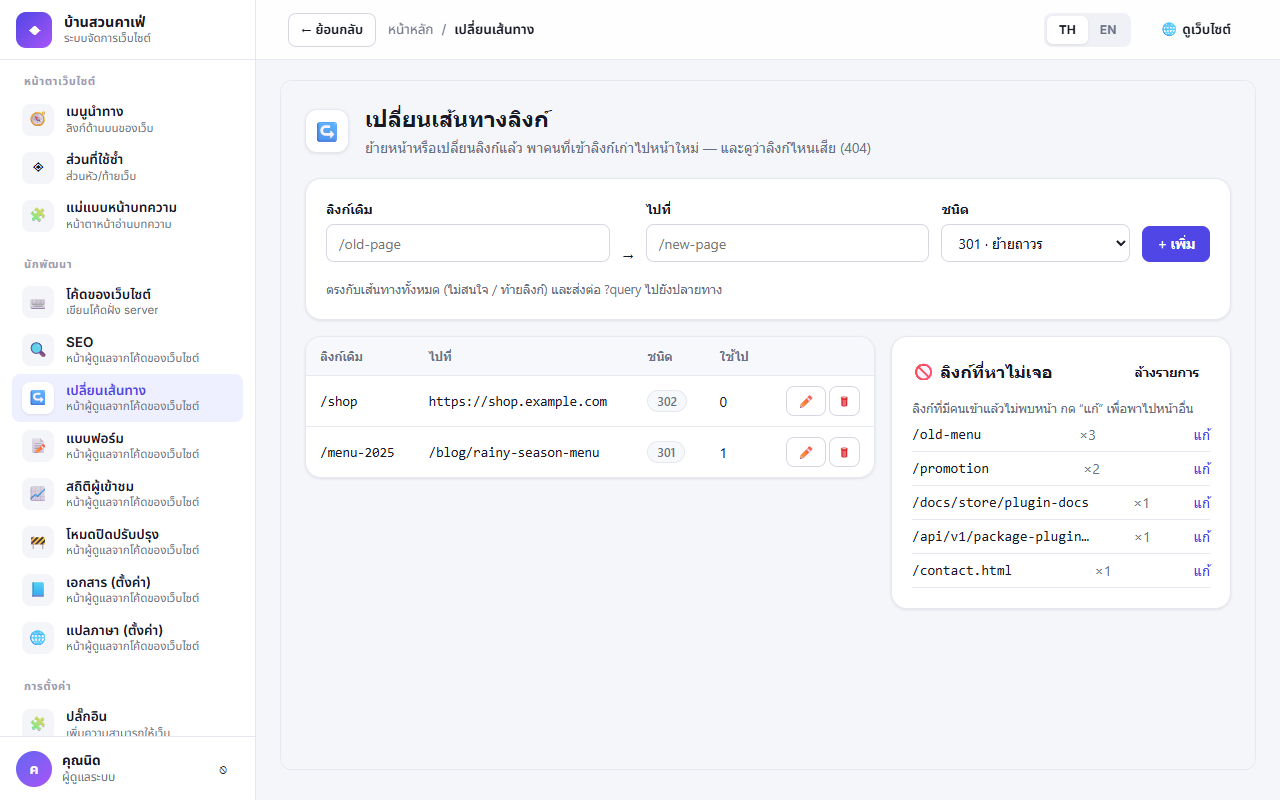
Adding a rule#
- Left menu Redirects → Add rule
- From — the old path, e.g.
/old-page(case-sensitive, a trailing/is ignored) - To — the new path, e.g.
/new-page, or a full link to another site - Type — usually 301 Moved permanently (Google moves the ranking); use 302/307 for temporary moves
- Save — open the old link to try it
- The old link's
?queryis passed on to the target (unless the target already has one) - Loops (A → B → A) are checked before saving, and the home page
/and system paths/api/,/uploads/,/plugin-assets/,/ext-ui/cannot be redirected. If a rule is wrong, the message shows under the form and clears on the next add - Each rule counts how often it was used, to help decide when an old rule can go
Not-found links (404)#
The bottom of the page keeps the 200 paths people most often opened and did not find, with counts — press Edit next to a path to make a rule from it, or Clear list when you are done.
Since 2.1.0, paths bots use to scan for secret files or other software (such as /.env, /.git/config, /wp-login.php, /phpinfo.php, .sql / .bak files) are not logged, so the site's real broken links don't get buried (clear the list once after updating to remove old entries).
Moving posts from /blog/... to /docs/... with the Docs plugin? Docs' own redirects (legacyRedirects) work too.
Permissions#
| Permission | Meaning | Default |
|---|---|---|
redirects.manage | Open the Redirects page and the 404 list | Administrator |