
Running the shop
Packages, payment and support
See your package and usage, upgrade or renew, pay safely through your support ticket, and talk to the team through Support
On this page
Packages#
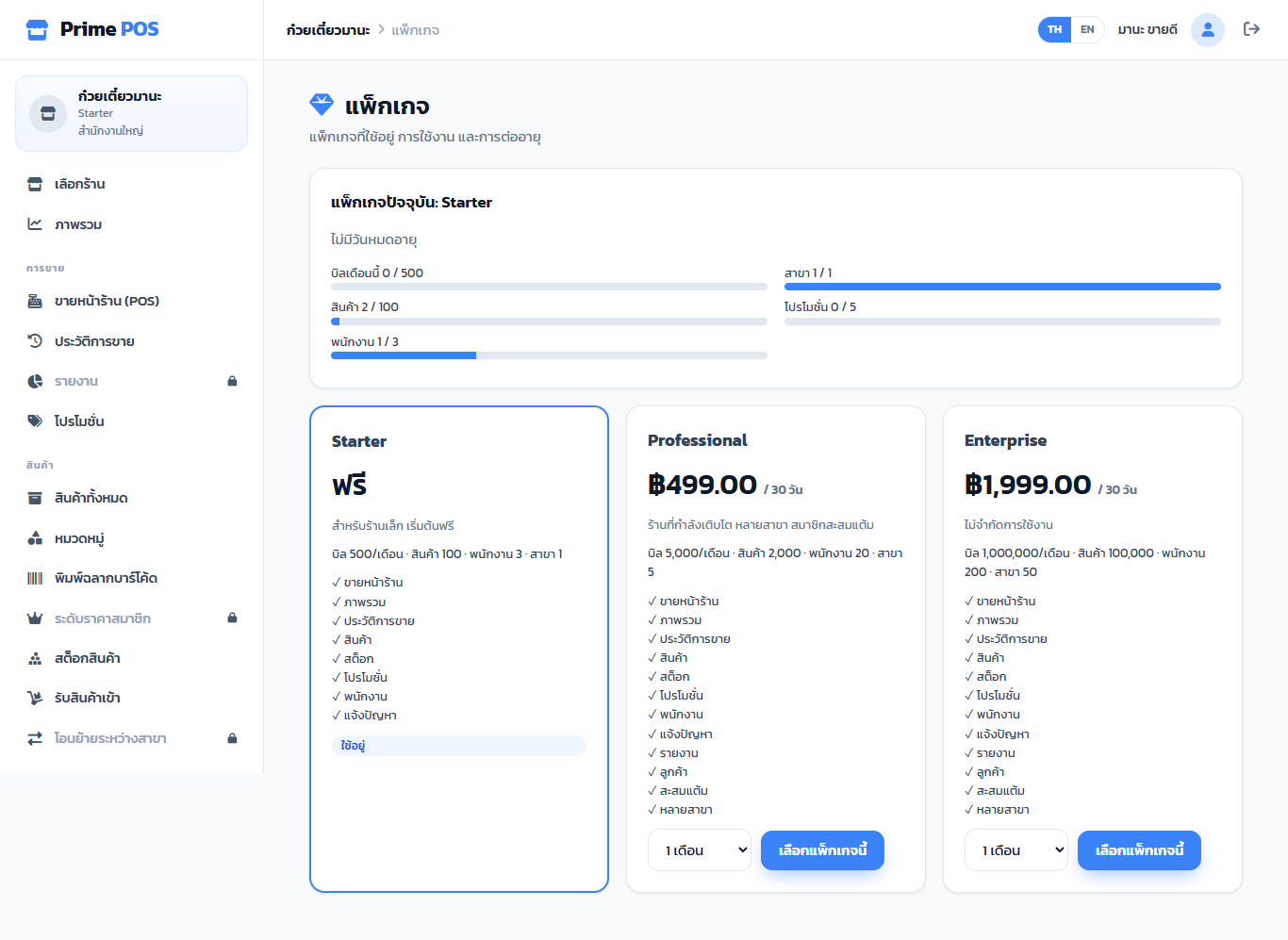
Package (owners only) shows the current package, its end date and usage (bills this month, products, staff, branches, promotions) against the limits.
Below are all packages with their limits and features (✓). The standard ones:
| Package | For | Adds |
|---|---|---|
| Starter (free) | Small shops starting out | POS, products, stock, promotions, staff |
| Professional | Growing shops | Reports, customers, points, several branches |
| Enterprise | No limits | The highest limits |
Real prices and limits are on the Package page in the app; the team can change them.
Menu items with a lock 🔒 are features your package does not have yet; they open this page.
Upgrade or renew#
- On the package you want, choose the months and press Choose this package (your current one shows Renew).
- If the site takes cards, you go to online payment and the package changes when it succeeds.
- Without a card, your request opens a ticket in Support by itself; the team sends the way to pay in that ticket.
- After paying, reply in the same ticket with a picture of the slip. The team checks it and confirms; the package changes at once and locked items open.
The team sends payment details only in your shop's Support ticket — never by private LINE, e-mail or phone. If you get them any other way, do not pay.
Payment history lists every payment: paid (until when) / awaiting confirmation / cancelled.
When a package ends, the shop goes back to the default package by itself; no data is lost.
Support#
Support → New ticket: subject, how much it affects your work, details and screenshots, then Send. The team is told at once.
| How much it affects your work | Use it when |
|---|---|
| Not working at all | e.g. you cannot sell or open the app (looked at first) |
| Partly working | Some screens or items fail, but you can still sell |
| A question / not urgent | How-to questions, suggestions |
Each ticket has a number (e.g. POS-12) to quote to the team. Its state uses the same words the team sees, e.g.
| State | Meaning |
|---|---|
| Waiting for the team | Sent, or you just replied |
| Answered / Waiting for you | A new reply (also by e-mail) |
| Resolved / Closed | Done, with the result |
A ticket you have just sent shows Sending… for a moment, then its number and state.
Solved? Press Solved — close (it asks first). A closed ticket shows Reply until a date — reply in it before then and it reopens.
When a ticket is done, How well did the team help? takes 1–5 stars, once.
Tickets marked Old system were answered before support moved to the new desk; they are read only. For anything more, open a New ticket.