
Customers and marketing
Promotions
Percentage off, amount off and buy X get Y — on the whole bill, on chosen products or on whole categories, with a minimum spend and dates
On this page
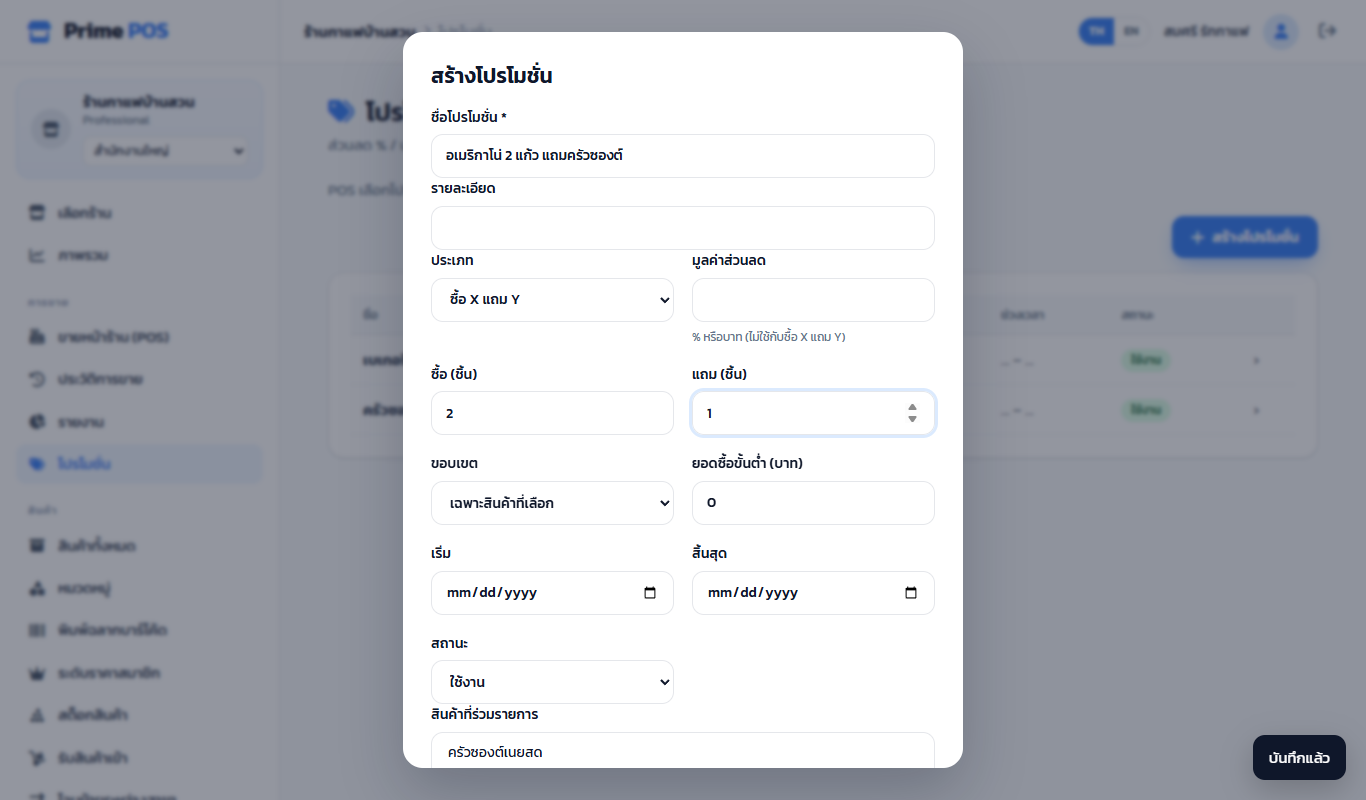
Promotions → Create promotion
| Field | Meaning |
|---|---|
| Type | % off · Amount off · Buy X get Y |
| Discount value | % or baht (not for buy X get Y) |
| Buy / Get (pieces) | For buy X get Y, e.g. buy 2 get 1 |
| Scope | Whole bill or Selected products |
| Products in the promotion | Several with Ctrl / ⌘ |
| or whole categories | Every product of the chosen categories, including ones added later |
| Buy X get Y: the free item is a different product | Empty = the same product is free · chosen = the cheapest of these in the cart is free |
| Minimum spend | The bill must reach it |
| Start / End | Empty = always |
| Status | Active / Disabled |
Examples#
- Bakery 20% off — % off · 20 · selected products · category Bakery
- 2 coffees, a free croissant — buy X get Y · buy 2 get 1 · product Americano · free item Croissant
- 50 off from 500 — amount off · 50 · whole bill · minimum 500
Which promotion applies#
When several match, the one that saves the customer the most applies, one per bill; then the member discount, the birthday discount, the bill discount and points. Its name shows in the cart and on the receipt.
How many promotions you can create depends on the package (Starter: 5).